
How to Choose the Right Rental Laptop
Our customers rent laptops for all kinds of purposes — trainings, events, employee use, and so much more. To help you choose the right laptop, we’ve categorized the PC models in our inventory into three categories: Basic, Business, and Workstation. Below is an at-a-glance flow chart, as well as more details on each category, so you can choose the best model for your needs. In addition, we’ve included info on MacBooks here for those considering Mac vs. PC.
Have questions? Don’t hesitate to reach out and we’ll be happy to evaluate your needs and recommend the right model.
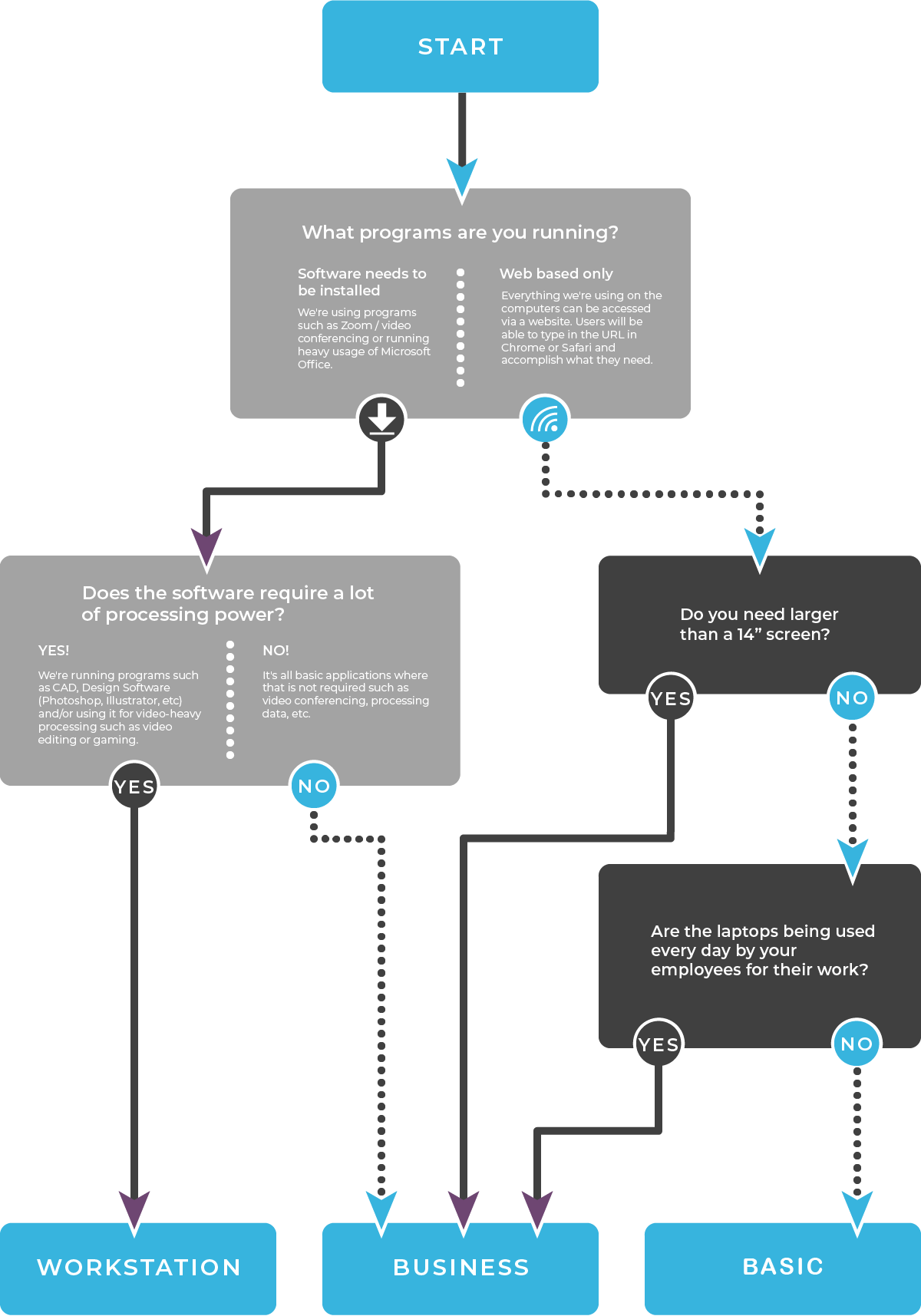
More Details on Our Rental Laptops
Basic Laptops
Basic laptops are ideal for running one application at a time, especially for web-based applications. While they are reliable and work flawlessly, they do not have advanced graphic cards or processing power. They are best for temporary use, meaning people use them for several hours or days at a time. This also is the most budget-friendly option, if cost is one of your top concerns.
Models:
|
Ideal uses:
|

Real Life Example:
One of our clients, a national student testing company, rents thousands of laptops in order to set up their temporary standardized testing centers for homeschooled students located all over the country. While they need thousands of laptops deployed seamlessly to hundreds of cities, each student only uses the laptop for a few hours to access the assessment site on a secure browser. This makes the basic laptop models perfect for their needs. We also provide headsets and mice.
Avoid for:
- Employees using the laptop every day for work
- Software requiring high end graphics cards and processing power
Business Laptops
Our Business laptops are ideal and efficient for multi-tasking and running multiple programs at once. They are commonly used for work applications including video conferencing, Microsoft Office, and most software needs. Available in 14″ or 15.6″ screen size and with 8 GB or 16 GB of RAM.
Models:
|
Ideal for:
|

Real Life Example:
One of our clients, a global creative network of agencies, needed to quickly rent hundreds of laptops for their employees to do their everyday work. Some employees were working from home, and some in the office, and they needed to rent laptops long-term that could handle all work applications seamlessly.
Avoid for:
- Video editing, gaming, design work
Workstation Laptops
Our workstation laptops have a dedicated video card and the highest amount of processing speed. They are ideal for processing a lot of visuals/motion as with gaming, graphic design, and video editing. They’re also ideal for user conferences, when you’re showing off the latest version of your software.
Models:
|
Good for:
|

Real Life Example:
A recent customer of ours needed over 130 workstation laptops for its employees for a year-long rental period. Our client is a fast growing start-up in the healthcare technology space, and planned to use their funding for growth oriented costs like marketing, hiring, and development. Leasing workstation laptops was the perfect solution for their them because they could spread out their IT costs over time, and still have high-quality laptops for daily employee use that run all their software perfectly.
Avoid for:
- Highest-end gaming / eSports competitions
MacBooks
Our Apple MacBook rentals have a dedicated video card and a high amount of processing speed (similar to our Workstation PC laptops). They are ideal for work uses that require macOS software or processing a lot of visuals/motion such as with graphic design and video editing. They’re also ideal for user conferences, when you’re showing off the latest version of your macOS software.
Good for:
- Work Applications
- Video Editing
- User Conferences
- Software demonstrations

Real Life Example:
A global software company needed hundreds of high-end MacBooks for recurring user conferences around the country. It was important to them to have a rental partner who could handle all logistics, technical support, and contingency plans so everything works perfectly for their users. On top of that, they’re able to save money over the cost of buying new models every few years.
Avoid for:
- Highest-end gaming / eSports competitions
More Rental & Event Resources

The 9 Questions to Ask to Avoid a Laptop Rental Nightmare
We’ve been renting laptops for nearly two decades now. And we can’t count the number of times we’ve picked up the phone to hear, “Can you help me? The company I was working with cancelled my laptop rental, and my event is in three days!” Even though we’re happy to help, we never like hearing […]

Event WiFi: Myths Vs. Facts
WiFi doesn’t have to be the wild wild west. We break down what you really need to know about event WiFi.

In-Person vs. Virtual vs. Hybrid: How to Choose Your Event Format
If you’re a meeting or event planner, you’ve probably felt like a ping-pong ball over the last 2 years-or-so since COVID changed our industry forever. As much as planners pour over the data and do our very best to peer (or, squint) into the future, this pandemic continues to surprise even the world’s leading epidemiologists. […]